Azure Capacity Reservations, Reserved Instances, and Savings Plans: How They Work Together
Last reviewed: May 6, 2026
One of the easiest ways to get sideways in an Azure cost conversation is to mix up three things that sound related but solve very different problems: On-Demand Capacity Reservations, Reserved Instances, and Savings Plans.
They can work together, but they are not interchangeable.
The simplest way to think about it:
Use Capacity Reservations when the question is “Will Azure have the capacity when I need it?” Use Reserved Instances when the question is “Can I get the best rate for a known, steady workload?” Use Savings Plans when the question is “Can I reduce compute costs while keeping flexibility?”
That distinction matters because one of these tools is about capacity assurance, and the other two are about pricing discounts.
The Short Version
On-Demand Capacity Reservations reserve VM capacity in a specific region or availability zone. They do not create a discount by themselves. They are for capacity assurance.
Reserved Instances provide a discount for predictable usage over a one-year or three-year term. They are best for stable, always-on workloads where the service, region, and VM family or size are unlikely to change.
Savings Plans provide a discount for eligible compute usage by committing to a fixed dollar-per-hour spend over a one-year or three-year term. They are best for consistent compute spend where the exact service, region, VM family, or architecture may change.
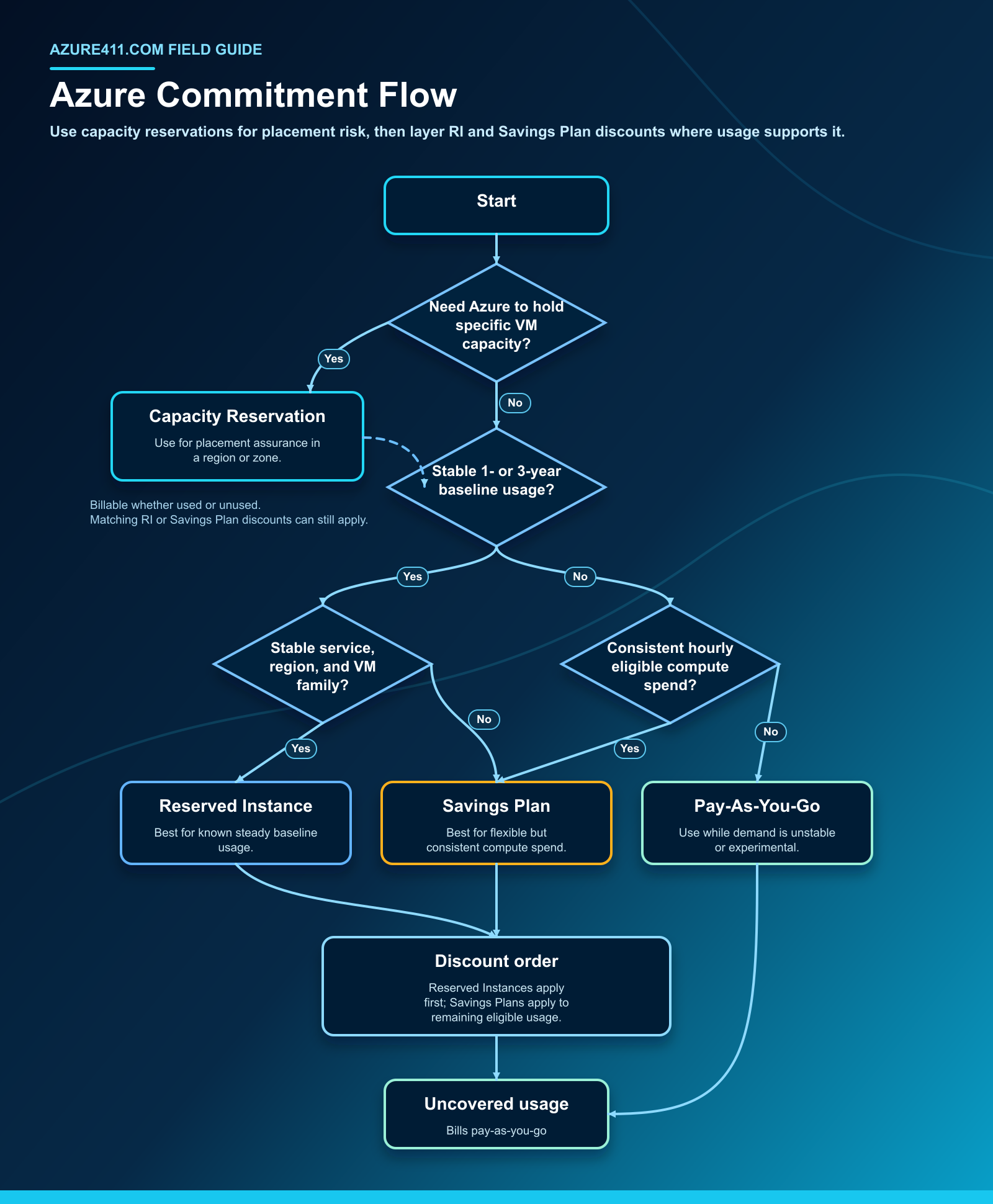
When more than one benefit can apply, Azure applies the more restrictive Reserved Instance benefit first, then applies Savings Plan benefits to remaining eligible usage.
Flow Chart
Capacity Assurance vs. Cost Optimization
The cleanest way to explain these offerings is to separate them into two layers.
Capacity assurance layer
On-Demand Capacity Reservations tell Azure to set aside VM capacity for a specific VM size, quantity, and location. That location can be a region, and in many scenarios it can be zonal.
This is useful when capacity availability itself is a risk. Think disaster recovery, critical application scale-out, event-driven demand, or production workloads that need a specific VM size in a constrained location.
Cost optimization layer
Reserved Instances and Savings Plans are billing constructs. They reduce the rate applied to eligible usage, but they do not reserve capacity.
Reserved Instances are narrower and more specific. Savings Plans are broader and more flexible. In return for that flexibility, the discount profile and planning motion are different.
How They Work Together
Here is the practical flow.
- You create an On-Demand Capacity Reservation for a VM size, quantity, and region or availability zone.
- Azure sets aside that capacity if it can fulfill the request.
- You deploy VMs that explicitly target the Capacity Reservation, or the reservation remains unused.
- Billing sees VM-capacity usage, whether that capacity is used by a VM or sitting unused.
- Azure applies matching Reserved Instance discounts first.
- Azure applies Savings Plan discounts to remaining eligible compute usage until the hourly commitment is consumed.
- Anything not covered by Reserved Instances or Savings Plans bills at pay-as-you-go rates.
The important point: a Capacity Reservation can be discounted by a matching Reserved Instance or eligible Savings Plan. Without one of those discounts, the reserved capacity is billed at the pay-as-you-go rate for the underlying VM size.
Also important: you are not charged twice when a VM consumes the reserved capacity. The bill reflects either the VM usage or the unused reserved capacity usage, plus normal charges for disks, networking, software, and other associated resources where applicable.
When To Use On-Demand Capacity Reservations
Use Capacity Reservations when capacity availability is a business or operational risk.
Good fits include:
- Disaster recovery plans that require capacity in a target region or zone
- Mission-critical applications that must start or scale at known times
- Seasonal or event-driven workloads where capacity risk is unacceptable
- Workloads that require a specific VM size in a constrained region or availability zone
- Planned migration cutovers where the team cannot tolerate capacity allocation failure
Avoid using Capacity Reservations as a savings tool. By itself, a Capacity Reservation does not lower the price. It reserves capacity and creates billable usage.
When To Use Reserved Instances
Use Reserved Instances for the steady baseline.
Good fits include:
- VMs or services that run continuously
- Production workloads with stable usage patterns
- Workloads with little expected change in service, region, VM family, or size
- Environments where the organization wants deeper discounts and can tolerate less flexibility
Be careful with:
- Workloads likely to move regions
- Workloads likely to change VM families or architectures
- Short-lived migration or test environments
- Buying based on peak usage instead of baseline usage
Unused reserved hours are lost for that hour, so the planning motion should start with the stable floor, not the occasional peak.
When To Use Savings Plans
Use Savings Plans for flexible, consistent compute spend.
Good fits include:
- Workloads that may shift across VM families or regions
- Modernization programs where the architecture is still evolving
- Mixed compute estates across eligible Azure compute services
- Portfolios with consistent hourly compute spend but less certainty about the exact SKU mix
Be careful with:
- Very spiky usage where the hourly commitment may sit unused
- Buying before right-sizing idle or oversized resources
- Assuming Savings Plans reserve capacity
Savings Plans are powerful because they can follow eligible compute usage more flexibly than a narrow reservation. But they still require a commitment. Unused hourly commitment does not roll forward.
A Practical Purchase Strategy
Here is the order I like for customer planning conversations.
1. Right-size first
Remove idle, oversized, or short-lived usage before buying commitments. Buying discounts against waste is still waste.
2. Protect critical capacity
Use On-Demand Capacity Reservations only where capacity availability matters. This is especially relevant for critical workloads, cutovers, DR plans, and constrained VM sizes or zones.
3. Cover the stable baseline with Reserved Instances
Buy Reserved Instances for usage that is very likely to stay consistent for the term. Start with the baseline, not the peak.
4. Cover flexible residual usage with Savings Plans
Use Savings Plans for consistent compute spend that is expected to continue but may move across services, regions, or VM families.
5. Monitor monthly
Review Reserved Instance utilization, Savings Plan utilization, and unused Capacity Reservations. These are not “set it and forget it” decisions.
Example Scenarios
Stable Production VM Fleet
You run 20 D-series VMs in East US all year with minimal expected changes.
Use Reserved Instances for the steady baseline. Do not add Capacity Reservations unless deployment or scale-out capacity is a real risk. Consider a small Savings Plan only for additional variable compute usage outside the stable baseline.
Critical Application With Zonal Capacity Risk
You operate a critical application that must scale to 10 specific VMs in Availability Zone 2 during business peaks.
Use an On-Demand Capacity Reservation for the required VM size, quantity, region, and zone. If the workload is steady and long-lived, pair it with matching Reserved Instances. Use Savings Plans for the flexible compute layer around it.
In this pattern, Capacity Reservation handles the capacity assurance. Reserved Instances or Savings Plans handle the rate.
Cloud Modernization Program
You are migrating workloads over 12 to 24 months. VM sizes, regions, and services are changing as teams modernize.
Avoid overcommitting to narrow Reserved Instances too early. Use Savings Plans for consistent compute spend that is expected to continue but may shift across services or regions. Add Reserved Instances later as workloads stabilize.
Disaster Recovery Readiness
You need confidence that a DR region has capacity for a specific VM size during failover.
Use On-Demand Capacity Reservations in the DR region or zone. Use matching Reserved Instances or Savings Plans to reduce the cost of the reserved capacity where applicable. Also validate quota, VM size availability, and runbooks.
Rules Of Thumb
- If the question is “Can I get capacity?”, think Capacity Reservation.
- If the question is “Can I get the lowest rate for a known steady workload?”, think Reserved Instance.
- If the question is “Can I reduce cost while keeping flexibility?”, think Savings Plan.
- If capacity is critical and the workload is stable, use Capacity Reservation + Reserved Instance.
- If capacity is critical but the surrounding compute estate is changing, use Capacity Reservation + Savings Plan.
- If usage is not steady, pay-as-you-go may be the better temporary choice.
Governance Checklist
Before purchasing:
- Confirm the workload owner, business criticality, and expected workload life
- Validate historical hourly usage
- Right-size idle or oversized resources
- Confirm region, availability zone, VM family, VM size, and quota needs
- Separate baseline usage from burst or seasonal usage
- Decide whether the problem is capacity assurance, cost optimization, or both
- Review existing Reserved Instance and Savings Plan utilization
After purchasing:
- Review Reserved Instance and Savings Plan utilization at least monthly
- Track unused Capacity Reservations and confirm whether they are still needed
- Revisit commitments after migrations, major resizing, regional moves, or architecture changes
- Confirm reservation scope aligns to the subscriptions generating matching usage
- Document the business owner for each capacity or cost commitment
Final Take
On-Demand Capacity Reservations, Reserved Instances, and Savings Plans are strongest when you use them together intentionally.
Capacity Reservations solve the availability problem. Reserved Instances solve the predictable baseline cost problem. Savings Plans solve the flexible compute discount problem.
The mistake is treating all three like generic “savings” tools. They are not. Start with the business requirement, separate capacity risk from cost optimization, and then layer the tools in the right order.
References
- On-demand capacity reservation in Azure
- What are Azure Reservations?
- How the Azure reservation discount is applied to virtual machines
- What are savings plans?
- How a savings plan discount is applied
- Decide between a savings plan and a reservation
Written by John L. Stelmaszek, Principal Solution Engineer at Microsoft and author of Azure411.com.